
10 Best Reselling Apps in 2026: Resell Apps for Pricing and Listing
The best reselling apps in 2026, prices checked Sept 27: eBay, Poshmark and Mercari to sell, Underpriced AI to price from a photo, Vendoo to cross-list.

Some links on this page are eBay affiliate links. If you buy through them, we may earn a small commission at no extra cost to you.
The best reselling apps in 2026 are eBay, Poshmark, Mercari and Facebook Marketplace for selling, Underpriced AI for pricing an item from a photo against real sold listings, Vendoo or List Perfectly for cross-listing, and SellerAmp with Keepa if you sell on Amazon. No single resell app does all of it, so most resellers run one marketplace, one pricing tool and, past a few dozen listings a month, one crosslister.
Want pricing, eBay listing and inventory in one place? See how Underpriced AI works as a reseller app.
Disclosure: I built Underpriced AI, so read that row with that in mind. Every competitor price below was checked on the vendor's own page on September 27, 2026, and linked so you can check it yourself.
Reselling apps compared
| App | What it does | Price (checked Sept 27, 2026) | Source |
|---|---|---|---|
| eBay | Sell almost anything to the biggest buyer pool | 250 free listings a month, then $0.35; 13.6% final value fee plus $0.30 or $0.40 per order in most categories | eBay fees |
| Poshmark | Sell clothing, shoes and bags | $2.95 on sales under $15, 20% at $15 and up | Poshmark |
| Mercari | Sell general used goods | 10% selling fee, no separate payment processing fee on listings created or updated since Jan 6, 2025 | Mercari help |
| Facebook Marketplace | Sell locally or shipped | 10% on shipped orders, $0.80 minimum | Facebook help |
| Underpriced AI | Photo to identification, sold comps and three list prices, then publish to eBay | First scan free, $0.25 a scan pay as you go, packs from $3 for 5, plans from $5 a month | Pricing |
| WorthPoint | Archive of past sale prices for antiques and collectibles | Paid subscription; its pricing page would not load for us, so check it at sign up | WorthPoint |
| Google Lens | Name an unknown item from a photo | Free | Google Lens |
| Vendoo | Cross-list to 10+ marketplaces | 14 day trial, then $14.99, $29.99 or $59.99 a month ($12.49 a month billed yearly for Starter) | Vendoo pricing |
| List Perfectly | Cross-list to 9 marketplaces, no add-ons | $29, $49, $69 or $99+ a month | List Perfectly pricing |
| SellerAmp SAS | Amazon sourcing: eligibility, profit, sales data | $19.95 or $29.95 a month, 14 day trial | SellerAmp pricing |
How accurate is photo pricing? We publish ours
Most pricing apps say they are accurate. We measure it against real sales every week and publish the result on our accuracy page, including the misses.
Each week the first photo of items sellers recently sold goes to other AI with no hints, and their answer is scored against the real sale price beside ours. In the September 28, 2026 update, on a $100 item:
| Model | Typically off by | Us, on the same sales | Showed sold listings | Sales |
|---|---|---|---|---|
| Underpriced AI | $33 | 82% | 78 | |
| Our model with no sold data | $35 | $33 | n/a | 78 |
| Perplexity | $43 | $33 | 51% | 77 |
| ChatGPT | $33 | $33 | 0% | 76 |
| Gemini | $30 | $25 | 11% | 9 |
Read it plainly. On price alone we tie ChatGPT and beat Perplexity. Gemini answered too few sales to call. What a reseller gets from us that a chatbot does not give is the receipts: 82% of our answers showed the eBay sold listings behind the number, so you can check the comps before you pay for an item. On sales where the seller set their own price, half landed within 38% of our number, and vintage, toys and pottery run widest. The page updates every Tuesday.
Selling apps
eBay
eBay is still where most resellers start, because it covers every category and has the most buyers. The app handles listing, offers, labels and Seller Hub analytics from your phone, and its barcode scanner fills in catalog details for books, media and boxed retail items.
Fees, from eBay's own fee page: 250 zero insertion fee listings a month, then $0.35 each. The final value fee in most categories is 13.6% of the sale up to $7,500, plus $0.30 on orders of $10 or less and $0.40 above that. Promoted Listings cost extra (see our eBay Promoted Listings 2026 guide).
Good for: reach, any category, auctions. Watch for: fees stacking with ads, and buyer friendly returns. Our eBay listing optimization guide covers the listing side.
Poshmark
Poshmark is the fashion marketplace. Sharing, follows and Posh Parties bring buyers to your closet, and Poshmark issues a prepaid shipping label the buyer pays for. It takes a flat $2.95 on sales under $15 and 20% on sales of $15 or more. Good for clothing, shoes and handbags; weaker for everything else, and it rewards sellers who share daily.
Mercari
Mercari has a quick listing flow and wide categories. Since January 6, 2025 it charges a 10% selling fee on item price plus buyer paid shipping, with no separate payment processing fee for new or updated listings (buyers pay their own protection fee). It is a good second marketplace for home goods, toys and electronics, with a smaller buyer pool than eBay.
For how the three compare head to head, see eBay vs Poshmark vs Mercari.
Facebook Marketplace
Marketplace is the default for furniture and anything heavy, because you can sell locally and skip shipping. On shipped orders Facebook deducts 10% of the order, with a $0.80 minimum. Expect lowball offers and no shows; it works best beside a structured marketplace rather than instead of one.
Pricing and research apps
Underpriced AI
Underpriced AI is a pricing and listing tool, not a marketplace. Here is what it does, plainly:
- You photograph an item. It names the brand, model, maker's marks and condition from the picture. Books, CDs and records can scan by barcode.
- It finds real sold listings for that item. Sold prices come from eBay first, through five sources in order (a specialist sold price API, a second vendor, a broadened search, a live scrape and our archive of recorded sales). Poshmark sold prices are added for fashion, Grailed for vintage clothing, Mercari when eBay sales are thin, and AbeBooks for books.
- It filters out lots, bundles and wrong variants, then gives a price, a range, a confidence grade and three list prices. The sold listings are one tap away.
- It writes the listing and publishes it to eBay in 10 eBay markets. A free Chrome and Firefox extension fills in the same listing on Facebook, Poshmark, Mercari, Depop, Vinted, Whatnot, OfferUp and Etsy.
- It tracks inventory, cost, profit and ROI, and it works inside ChatGPT and Claude.
Price: first scan free, then $0.25 a scan pay as you go, credit packs from $3 for 5 scans, or plans at $5 a month (30 scans), $12 (75), $24 (160) and $59 (425).
Good for: pricing mixed thrift, estate and garage sale finds where you do not know what you have. Weak spots, from our own published grade: vintage, toys and pottery sell across a wide spread of prices, and the result page says so next to the number. It is not a marketplace, so you still need one of the apps above to sell.
WorthPoint
WorthPoint is a deep archive of past sale prices for antiques, art and collectibles, drawn from auction houses and online sales, plus a marks library. When a piece almost never sells, that history is hard to replace. It has no photo identification, so you need to know what you are searching for, and it is a paid subscription. Our WorthPoint review covers when it pays for itself.
Google Lens
Google Lens identifies an item from your camera and shows visually similar products with shopping links. It is free and fast in the aisle. It shows retail and asking prices, not what the item sold for used, so treat its number as a starting point for a sold search.
Cross-listing apps
Vendoo
Vendoo lets you write a listing once and post it to 10+ marketplaces, with auto delisting when an item sells. From its pricing page: a 14 day free trial, then Starter $14.99, Growth $29.99 and Pro $59.99 a month, with yearly billing lower (Starter is $12.49 a month billed yearly). Every plan lists unlimited items and all marketplaces; higher plans add PhotoRoom background removals.
List Perfectly
List Perfectly sells itself on all inclusive pricing with no add-ons: Simple $29, Business $49, Pro $69 and Pro Plus $99 and up per month. It supports 9 marketplaces (Depop, eBay, Etsy, Facebook, Grailed, Mercari, Poshmark, Vestiaire Collective, and Vinted as a lite marketplace without automatic sale detection). No yearly discount is shown.
More detail on both, and on cheaper options, is in our best cross-listing apps comparison.
Amazon sourcing apps
SellerAmp SAS with Keepa
SellerAmp answers the three Amazon questions: can I sell it, does it sell, and is it profitable after FBA fees. Plans are $19.95 a month (1,000 products analysed) or $29.95 a month (unlimited lookups under a fair use policy), with a 14 day trial and two months free on yearly billing. Most FBA sellers pair it with Keepa for price and rank history; Keepa's data subscription is listed at 29 euros a month. Only useful if you sell on Amazon.
How to build your reselling app stack
Layer apps by job, and add the paid ones only when volume pays for them.
- Selling: start on eBay. Add Poshmark if you sell fashion, Mercari for general goods, and Facebook Marketplace for bulky local sales.
- Pricing: Google Lens to name an item for free, a sold comps tool to price it, and WorthPoint if you specialise in antiques. For free eBay native research, see our Terapeak guide.
- Cross-listing: once you sell on three or more marketplaces, Vendoo or List Perfectly saves the duplicate work.
- Amazon: SellerAmp plus Keepa.
By stage: a beginner needs the eBay app and a way to check sold prices. A part time flipper at 20 to 50 items a month adds a second marketplace and a pricing tool. Past 100 items a month, a crosslister earns its fee. For sourcing ideas, see the best items to flip for profit.
Frequently Asked Questions
What are the best reselling apps in 2026?
eBay, Poshmark, Mercari and Facebook Marketplace to sell; a sold comps pricing app such as Underpriced AI to price from a photo; Vendoo or List Perfectly to cross-list; and SellerAmp with Keepa for Amazon. Which ones you need depends on what you sell and how many items a month.
What is the best reselling app to start with?
The eBay app. It has the most buyers, every category and 250 free listings a month. Add a second marketplace and a pricing tool once you have a few sales.
Do I need to pay for a reselling app?
No, not to start. eBay, Poshmark, Mercari, Facebook Marketplace and Google Lens are free to use and charge only when you sell. Paid tools are pricing research, cross-listing and Amazon sourcing, and they usually pay off once you list more than about 20 items a month.
What app do resellers use to check prices?
Most check eBay sold listings, either by hand in the eBay app or through a pricing app that finds the sold listings from a photo. Google Lens names an item for free but shows asking prices, not sold prices. For antiques, WorthPoint's archive covers rare pieces.
Which reselling app is most accurate for pricing?
Few publish it. Our accuracy page grades our estimates against real sales every week and runs the same photos through ChatGPT, Perplexity and Gemini. In the September 28, 2026 update we were typically $33 off on a $100 item, tied with ChatGPT and ahead of Perplexity at $43, and the only one of the four that showed the sold listings on most answers.
What is the best app for cross-listing?
Vendoo and List Perfectly. Vendoo starts cheaper at $14.99 a month after a 14 day trial; List Perfectly starts at $29 with no add-ons. See our cross-listing apps comparison.
Can I use these apps on iPhone and Android?
Yes, all of the selling and pricing apps here run on both. SellerAmp is used mostly through its Chrome extension, and the crosslisters work best on a laptop.
Try Underpriced AI on web or mobile: the first scan is free, then packs start at $3 for 5 scans. And if you are still deciding what to price, our guide to the apps that tell you what your stuff is worth compares the valuation apps side by side.
Scan, value, and list, all in one app.
Snap a photo and see real sold prices from eBay, Poshmark and Mercari, then cross-list to all of them in a few taps. Your first scan is free.
Try a Free ScanFree first scan, no credit card required
Founder of Underpriced AI. Building tools for resellers with 30+ years of software engineering experience.
Know a reseller who'd want this?
Related Articles


Ready to find out what your stuff is worth?
Snap a photo and see what it actually sold for, with the real sold listings behind the price. First scan free, no credit card.
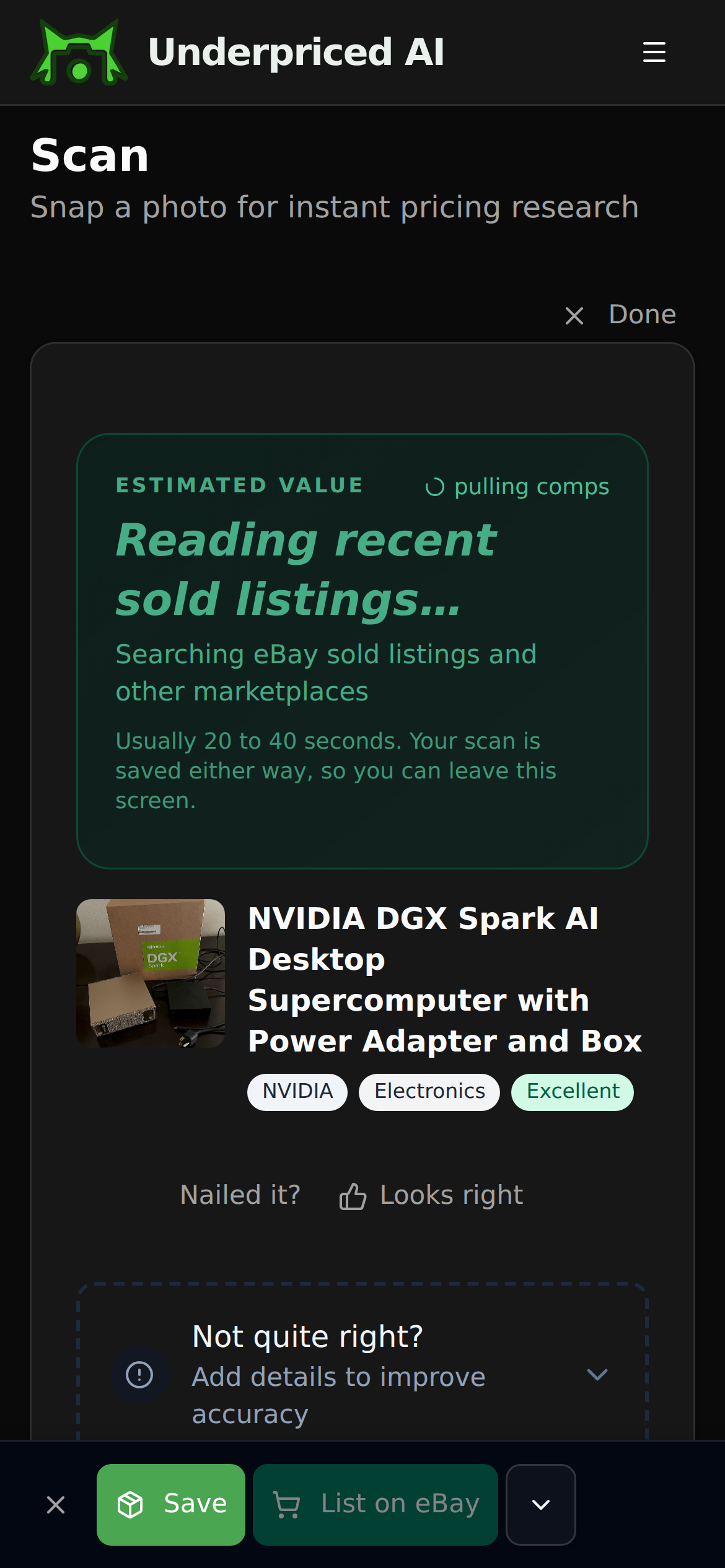
1. Photograph it
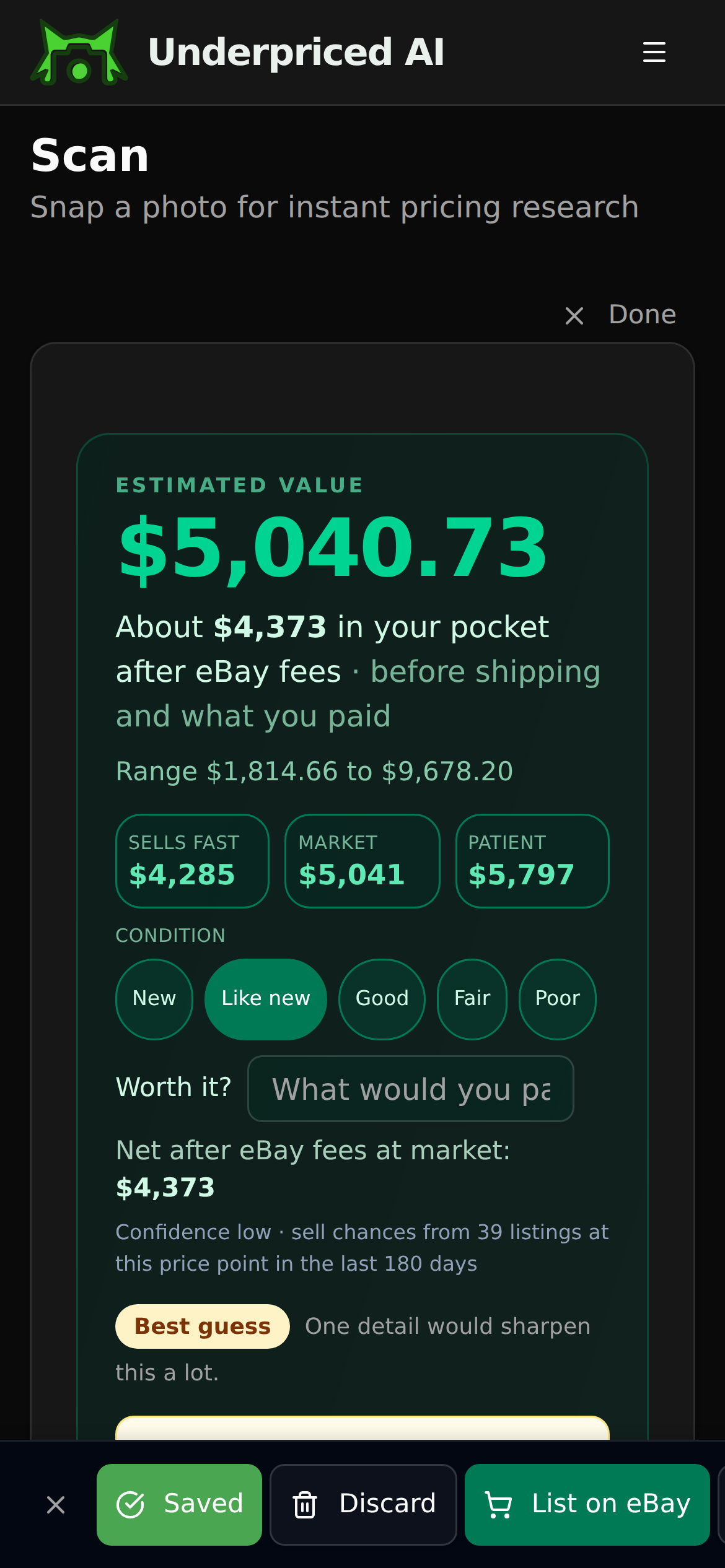
2. See what it sold for
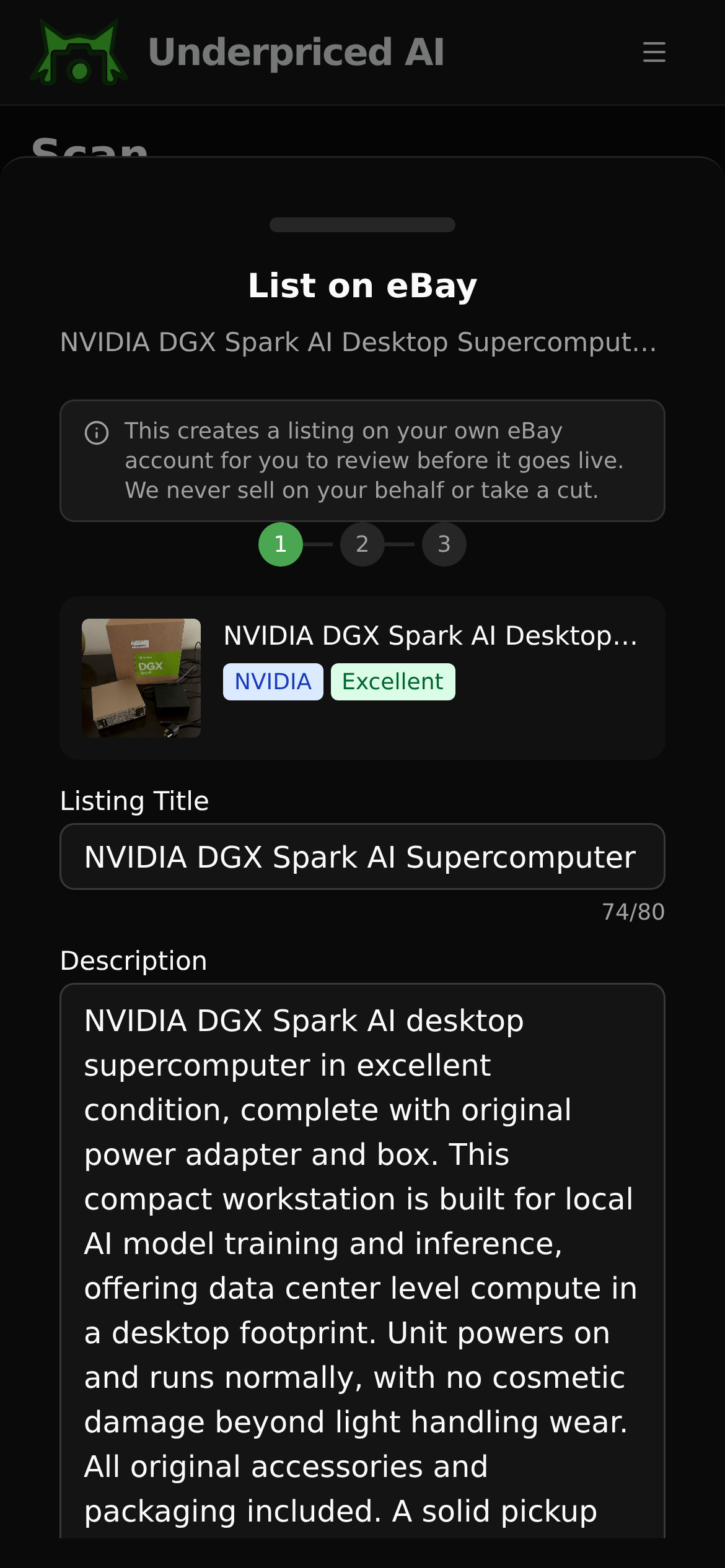
3. List it
Find our guides useful? Get more of them in Google Search.