
Google Lens vs Underpriced AI: Which Tells You What It Sells For
Google Lens identifies items free, but does it tell you what they resell for? How it compares on identification, real sold prices and listing.

The Question Both Apps Answer Differently
You point your phone at a mystery item in a thrift store, an estate sale bin, or your own closet. Both Google Lens and Underpriced AI will give you an answer in seconds. But they're answering two different questions. Lens tells you what something is. Underpriced AI tells you what it sells for and lets you list it.
That distinction matters more than it sounds. If you're a casual seller trying to identify a weird kitchen gadget, Lens is fantastic and free. But say you're a reseller standing in a thrift aisle. You're deciding whether a Pyrex bowl or a pair of Salomon boots is worth the $6 price tag. "What is this" isn't the question you need answered. "What does this actually sell for, based on real completed sales" is.
Here's the direct answer. Google Lens shows you shopping and web results. Those are mostly asking prices from retailers and marketplace listings, not confirmed sold prices. Underpriced AI identifies the item and prices it using real sold eBay comps, then lets you list it straight to your marketplace. If you need identification only, Lens wins on cost (free) and speed. If you need a resale number you can trust before you buy or before you list, Lens can't get you there on its own.
What Google Lens Actually Does
Google Lens is a visual search tool built into Android, the Google app, and Chrome. Snap or upload a photo and it runs image recognition against Google's index, then returns:
- Visual matches: similar-looking images from across the web
- Shopping results: retailers currently selling the same or similar item
- Text and translation: it can read labels, tags, and text in the photo
- Product info: brand, model, or category guesses based on visual similarity
For identification, it's genuinely good. Point it at a lamp with no maker's mark and Lens will often surface the exact model from a furniture retailer's catalog page. Aim it at a plant, a car part, or a piece of art and it'll usually get you close enough to search further.
Where Lens Stops
Lens was built for shopping and curiosity, not resale. Three gaps show up fast once you're actually trying to flip items:
- It shows asking prices, not sold prices. A Coach Manhattan bag might show up in Lens shopping results at $220, $180, and $95 across three different retail listings. None of those tell you what one actually sold for last week. Google Lens resale value estimates are really just live listing prices scraped from the web. Asking price and sold price are frequently 30 to 50% apart on secondhand goods.
- It doesn't understand condition. A "mint in box" Star Wars figure and one missing an arm look nearly identical to an image classifier. Condition is often the single biggest swing factor in resale value, and Lens has no mechanism to account for it.
- It stops at the search results page. There's no comps history, no median sold price, no way to list the item. You still have to manually search eBay's sold listings, filter, and average things out yourself.
That last part is the real time sink. Anyone who's tried to price a lot of 40 vintage Hot Wheels or a box of Fiestaware knows the problem. Manually pulling sold comps for each piece can eat an entire evening.
What Underpriced AI Does
Underpriced AI is built specifically for the resale workflow: scan, get a resale value backed by real sold data, then list. The process looks like this:
- Scan the item with your phone camera (web app, iOS, or Android).
- Underpriced AI identifies the item (brand, model, edition, material) the same way a visual search tool would, but then goes a step further.
- It pulls real sold comps from eBay, not current asking prices. It returns a resale price range based on what similar items in similar condition have actually sold for recently.
- You can list directly to eBay in a few taps from the same scan, no re-typing titles or specs.
This is the difference between an app to price items to resell and an app that just tells you what an item is called. Identification is step one. Sold comps are step two. Listing is step three. Lens only does step one.
We built the pricing engine around Claude Opus for a reason. Condition and small details (a reweave versus a repro, a first-run tag versus a reissue) change the number significantly. We've written before about why that model choice matters so much for accuracy in The $45 Gucci Heels: Why We Use Claude Opus on Every Scan.
Head-to-Head: Identification, Pricing, Comps, Listing, Cost
Identification
Both apps handle straightforward identification well. Lens has a slight edge on truly obscure objects (plants, car parts, random household items) because its image index is enormous and general-purpose. Underpriced AI is tuned specifically for resale categories: clothing brands and tags, sneakers, collectibles, vintage electronics, glassware, and furniture. There, getting the exact edition or era right changes the price by hundreds of dollars.
Say you're staring down a maker's mark you've never seen on a bronze sculpture. Precise identification is everything, which is why we built out a dedicated resource on bronze foundry marks separate from general scanning.
Resale Pricing Accuracy
This is the category where the two tools genuinely diverge. Lens shows you shopping results scraped from retail and marketplace listings. Those are asking prices. Underpriced AI returns a price range built from sold comps, meaning transactions that actually closed.
The gap between asking and sold is real. In our own scan data through 2026, we've seen vintage Champion reverse weave hoodies listed for $85 to $150. They were actually selling, based on completed eBay transactions, in the $45 to $75 range depending on tag era and condition. If you priced off Lens's shopping results alone, you'd list too high and sit unsold for months. We cover exactly which reverse weave details move the number in our Vintage Champion Value Guide.
Sold Comps
Lens has no sold comps feature at all. It is not built to search eBay's completed listings database. Underpriced AI's entire pricing model runs on sold comps as the source of truth. This is the single biggest reason resellers search for a "sold comps app" instead of relying on general visual search.
Listing and Selling
Lens does not list items anywhere. It's a discovery tool, full stop. Underpriced AI lets you go from scan to a published eBay listing without re-entering title, category, or item specifics manually. If you're cross-listing across multiple platforms too, pair this workflow with a broader cross-listing apps strategy so the same photo set works on eBay, Poshmark, and Mercari.
Cost
Google Lens is free, full stop, and that's not nothing. Underpriced AI runs on scans:
- Every new account gets 1 free scan
- Scan packs (never expire): 5 scans for $3, 15 for $9, 30 for $15, 50 for $22, 100 for $40, 250 for $90
- Monthly plans: Starter $5/month (30 scans), Pro $12/month (75 scans), Pro Plus $24/month (120 scans), Business $59/month (325 scans), Power $99/month (750 scans), Scale $199/month (1,800 scans included, then $0.12 per scan metered, no cap)
- Annual billing on Starter through Power saves about 20%
If you're pricing one item a month, Lens's free identification plus a manual eBay sold search is a fine workaround. If you're pricing a bin of 60 thrifted items a week, the math flips fast. At $3 for 5 scans, you're paying 80 cents a scan to skip 20 minutes of manual sold-comp digging per item. That time is worth more than 80 cents to almost every serious reseller.
When to Use Each
Use Google Lens when:
- You genuinely don't know what an item is (a strange kitchen tool, an unmarked plant, unfamiliar text on a label)
- You just want a rough sense of what similar items are listed for right now, not what they sell for
- You're not planning to sell it, just curious
Use Underpriced AI when:
- You're standing in a thrift store or estate sale trying to decide if an item is worth buying, and you need a real resale number fast
- You already know roughly what an item is but need a price backed by actual sold data before you set a listing price
- You want to skip the manual step of searching eBay's sold filters yourself
- You want to list the item without retyping details from scratch
A lot of the resellers I talk to use both, just for different moments. Lens for the true mystery object. Underpriced AI for the "okay, I know it's a Pendleton blanket, now what does it actually sell for" moment. That's the moment that determines whether you buy it at all.
If you're sourcing at estate sales specifically, timing and item knowledge matter as much as pricing tools do. Our guide on estate sale sourcing and our roundup of estate sale and garage sale sourcing apps pair well with either pricing tool once you're actually in the field.
Pricing a Whole Lot, Not Just One Item
Most people asking "what is my item worth" don't have just one item. You've got a bin of 40 vintage t-shirts, a china cabinet of Depression glass, or a shoebox of Pokemon cards from a storage unit buy. The workflow that actually saves you money is this. Use your one free Underpriced AI scan on the piece you're least sure about, the one where guessing wrong costs you the most. A potential $200 Harley-Davidson 3D emblem tee versus a $15 generic band shirt is one example, a distinction we break down in our Vintage Harley-Davidson T-Shirt Value Guide.
Once you know that piece is worth chasing, price the rest of the lot with a cheap scan pack. Don't scan everything for free, since that's not how the free tier works. A 250 scan pack works out to 36 cents a scan. That's a rounding error compared to the money you'd lose pricing a $150 item like a $20 item because Lens only showed you a stranger's asking price.
Common Questions
Does Google Lens show resale value or just retail price?
Google Lens shows shopping results and visually similar listings from across the web, which are almost always current asking prices from retailers or active marketplace listings. It does not show sold prices, so it's not a reliable measure of actual resale value.
What's the difference between an asking price and a sold comp?
An asking price is what a seller is currently requesting for an item that may or may not sell. A sold comp is a completed transaction, proof that a buyer actually paid that amount. Sold comps are the only reliable way to price resale items, since asking prices are frequently inflated by 30% or more.
Can Underpriced AI identify items Google Lens can't?
Underpriced AI is tuned for resale categories like clothing tags, sneakers, collectibles, and vintage goods, so it often catches edition and era details general visual search misses. For truly obscure non-resale objects like plants or car parts, Google Lens's broader index can have an edge.
Is there a free way to check sold prices without an app?
Yes, you can manually search eBay, filter by "Sold Items" and "Completed Listings," and average the recent results yourself. It works, but it's slow when you're pricing more than a handful of items, which is the main reason resale-specific pricing apps exist.
Do I need both Google Lens and a resale pricing app?
Many resellers use both. Lens is useful for identifying something you genuinely don't recognize, while a resale pricing app like Underpriced AI is built for the next step: turning that identification into a real, sold-comp-backed price and a listing.
Frequently Asked Questions
Is Google Lens accurate for estimating what a thrift store item will sell for?
Not reliably. Lens returns visual matches and shopping results, which are current asking prices from retailers and active marketplace listings, not completed sales. On secondhand goods, asking and sold prices are frequently 30 to 50% apart, so a Lens number can push you to overpay when sourcing or overprice when listing.
Does Google Lens factor in an item's condition when showing prices?
No. An image classifier sees a mint in box Star Wars figure and one missing an arm as nearly identical. Condition is often the single biggest swing factor in resale value, and Lens has no mechanism to account for it, so its results treat damaged and pristine examples the same way.
Can you list an item for sale directly from Google Lens?
No. Google Lens is a discovery tool that stops at the search results page, with no comps history, no median sold price and no listing function. Underpriced AI, by contrast, goes from one scan to a published eBay listing in a few taps, so you do not retype the title, category or item specifics.
How much does a resale pricing app cost compared to Google Lens?
Google Lens is free. Underpriced AI gives every new account one free scan with no card required, then credit packs start at $3 for 5 scans, or you can use a subscription. There is no free trial beyond that single scan. It runs on web or mobile, so no separate setup is needed.
Two Tools for Two Different Problems
Google Lens will tell you what something is, and it will do it for free, forever. That's worth appreciating, not dismissing. But identification was never the hard part of reselling. Pricing is. Knowing what a Pyrex Butterprint bowl in mint condition has actually sold for this year, not what three different Etsy sellers are asking for it, is the number that actually determines whether you profit.
Use Lens to name the mystery item. Use Underpriced AI to find out what it sells for and get it listed. They're not really competing tools. They're solving two different problems that only look the same because they both start with a camera.
Scan, value, and list, all in one app.
Snap a photo and see real sold prices from eBay, Poshmark and Mercari, then cross-list to all of them in a few taps. Your first scan is free.
Try a Free ScanFree first scan, no credit card required
Related value guides
Founder of Underpriced AI. Building tools for resellers with 30+ years of software engineering experience.
How this was made: drafted with AI from our own sold-listings data and the sources cited, and published by Frank for Underpriced AI. Spot something wrong? Tell us and we'll fix it.
Know a reseller who'd want this?
Related Articles


Ready to find out what your stuff is worth?
Snap a photo and see what it actually sold for, with the real sold listings behind the price. First scan free, no credit card.
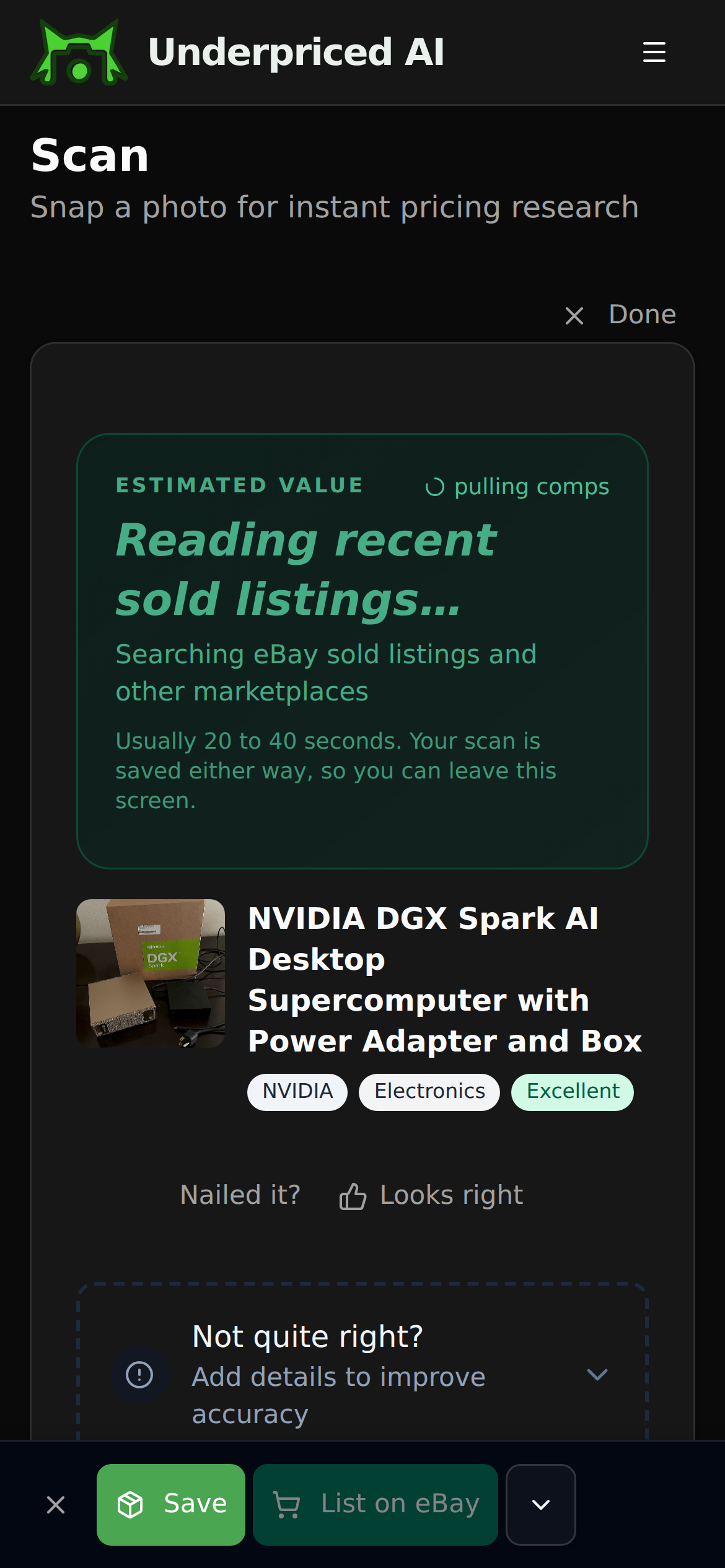
1. Photograph it
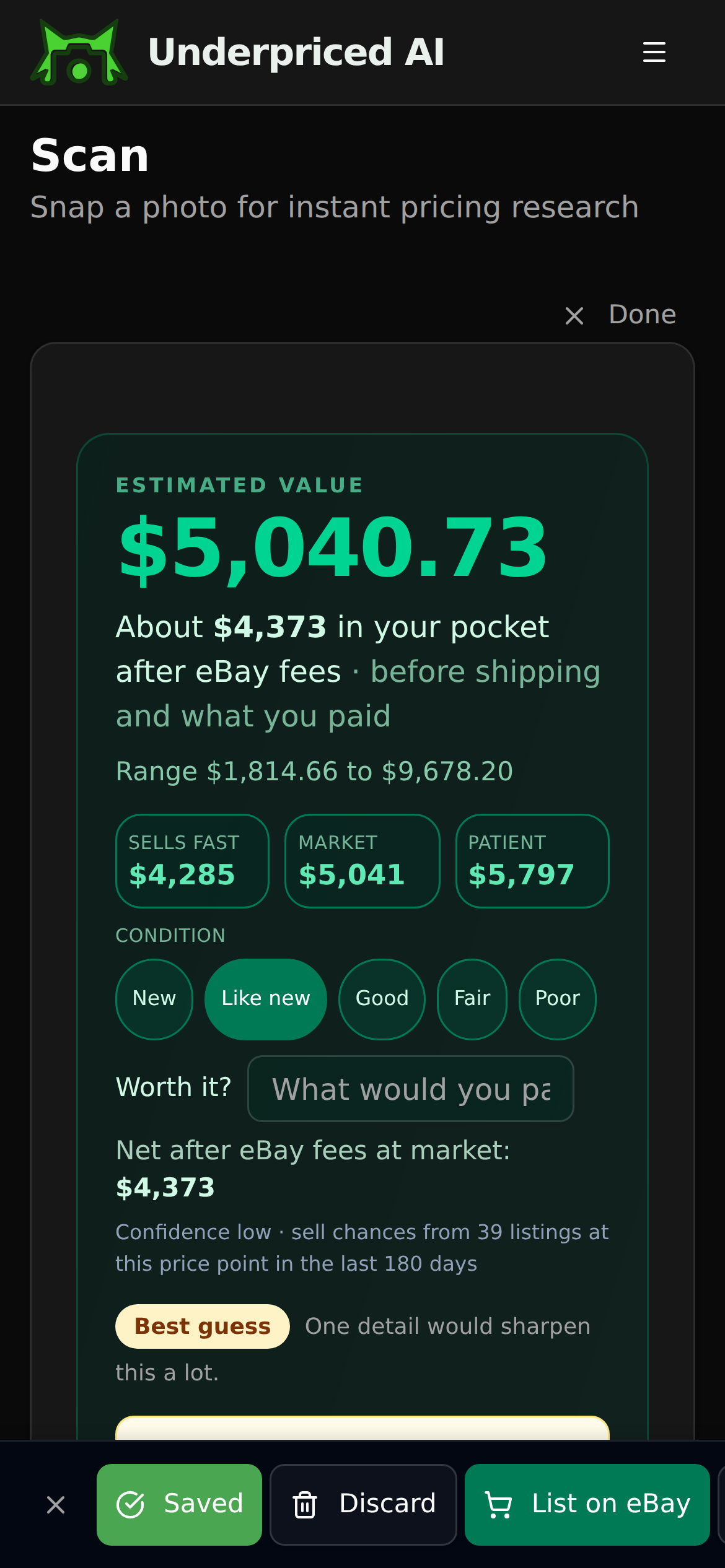
2. See what it sold for
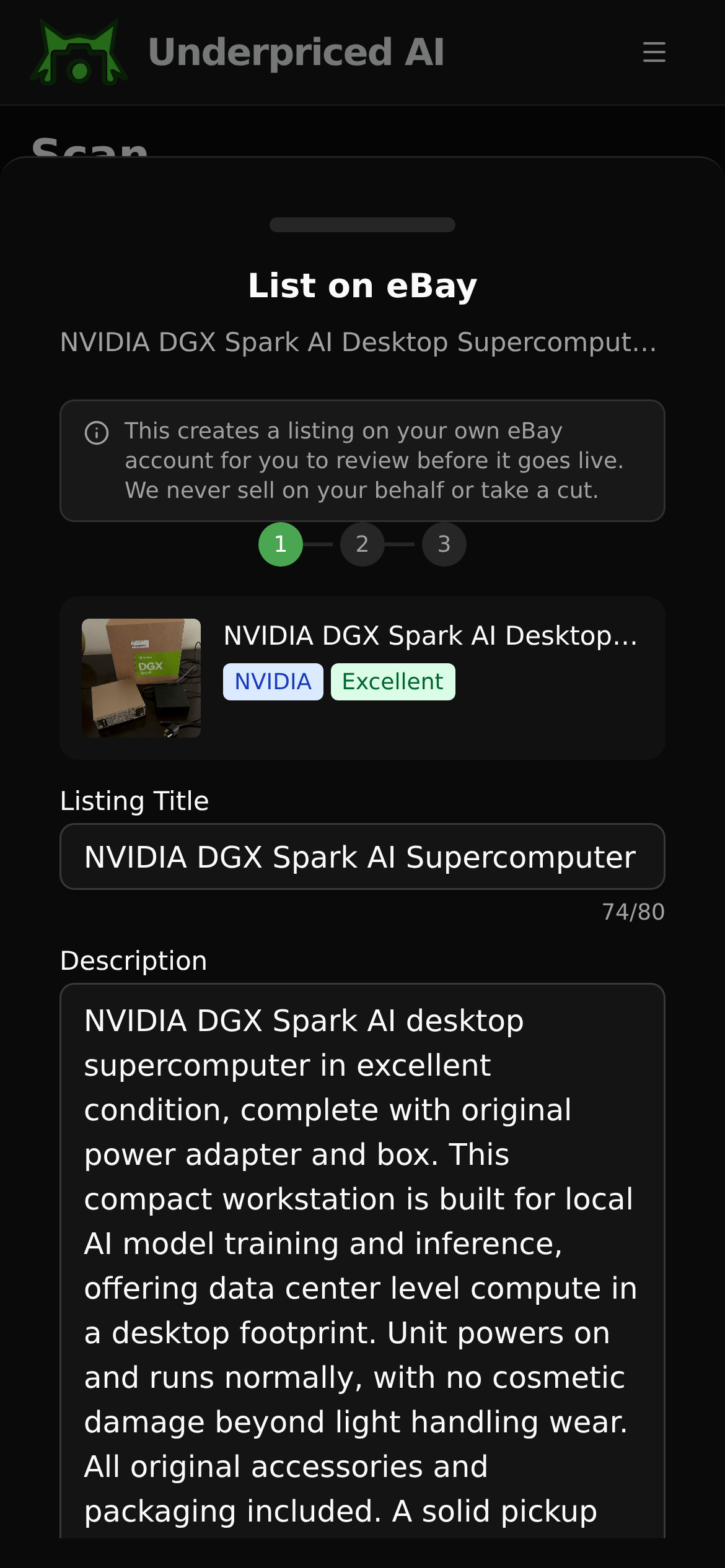
3. List it
Find our guides useful? Get more of them in Google Search.